
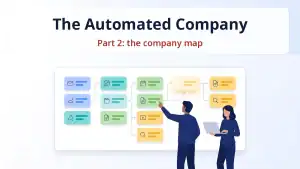
The Automated Company, part 2: the company map, or where to start with automation

2026-10-18

This is the second part of “The Automated Company” series. In part one I wrote about why at Element we hand routine work to automations and leave decisions to people. Today I start with a foundation that is easy to skip because it does not pay off right away: the company map. Before you automate anything, first write down what your company is made of: what processes it has, why each of them exists and how you can tell it works. If you read Polish, there is also a Polish version of this article.

Without such a map, automations multiply chaotically. Each one is built for a single problem, and nobody remembers what already exists, what depends on what, or which automation has quietly been doing nothing for a week. With five automations you can keep all of this in your head. Our map has 44 cards today, and it no longer fits in anyone’s head. I explain what a card is a few paragraphs below.

Who should draw the map

In my view, the company map should be created by someone with business experience who was personally responsible for the mapped processes or supervised them, meaning someone who was close to them every day. A card is only as good as the knowledge of the person who writes it. A programmer without that knowledge will describe what the code does, but will not tell you why the process exists at all or how to tell it has stopped doing its job.

As for me, I have been deep in all kinds of business processes for years. Over more than a decade I built two companies from scratch and ran them. The first was the recruitment agency Lobo HR, which I founded in 2010, shortly after passing the bar exam, as a complete greenhorn in business. I told its story in the article “Lobo HR: the history of, and farewell to, the company that gave me what I love” (in Polish). Since 2014 we have been developing Element. Over those years I learned business from the ground up: sales, recruitment, finance, customer service and product. I learned the most from my own mistakes, and today those mistakes are written into the cards as risks and rules.

That is why the mapping should involve people who understand these processes well. AI is great at helping to phrase a card, organize it and keep it up to date, but it does not know which process matters most to the company or what happens when it stops working. A person has to bring that.

What a card is

On the map, every process or automation has one card. The card says:

  • why the process exists, that is, its business goal, written as an outcome,
  • which business line it belongs to (for us: the Element system, trainings, or back office shared by both),
  • which step of the funnel it works on: customer acquisition, qualification, service delivery or back office,
  • which indicators tell us whether it works,
  • what state it is in: running every day or under construction,
  • what it depends on and which other processes it feeds with data,
  • what plans and risks it has, and what has changed in it recently.

13 examples from our map

Below are thirteen cards from our map, each described in one sentence, namely its goal. I left out technical details and data that should not leave the company.

  • Company finder: keeps a stock of verified companies that are hiring right now, so that outreach to new companies never stalls for lack of contacts.
  • Sales bot: runs sales conversations with recruiting companies, deciding on its own when to write and what to say. It sends messages in a way that does not hurt the reputation of our domains.
  • CRM: is the single source of truth about contacts, companies and deals.
  • Contact form replies: no lead from the contact form waits more than a few minutes for a reply.
  • Demo accounts: every client on a demo account gets a question after 3 days asking whether everything works, and after 7 days a notice that the demo is closing, after which the account is free for the next one.
  • Account order for a new client: on the day we win a deal, the client’s account is ordered in the system, with complete data from the CRM and no manual retyping.
  • Client churn: within a month of a client leaving, we know why, backed by a quote from an email or conversation, so I can call while it is still fresh.
  • System mail monitor: if Element stopped accepting candidate applications or sending thank-you emails for applications, I would know within a few minutes, before clients report it.
  • Competitor prices: our ATS price comparison page (in Polish) stays up to date, and I learn about a competitor’s price change within two weeks at most.
  • Data for the Grant Thornton report: on the fifth day of each month, the team gets the complete job posting figures for the previous month and only checks them instead of counting.
  • YouTube channel: videos about Element go up on the channel without manual uploading, with complete titles, descriptions and playlists.
  • Newsletter topic radar: every few days it collects news from HR and AI, from which I choose topics for the newsletter.
  • Weekly review: every week we know which automations are doing their job and which have quietly stopped working or drifted away from their description.

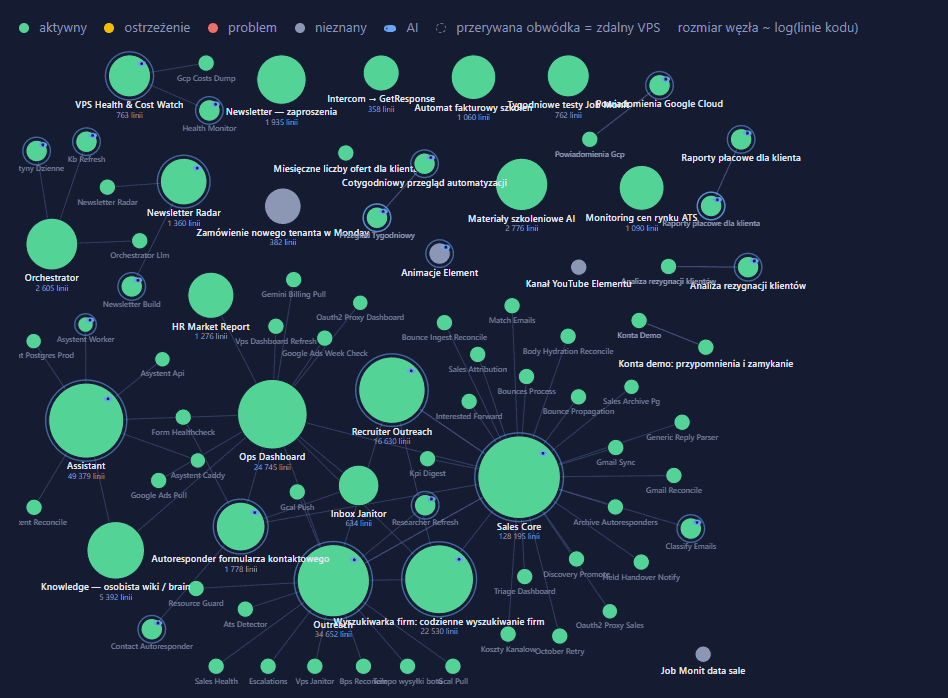
Almost every goal talks about an outcome for the client or for the company. Some of them have their own KPIs, and when one is missed, it is reported immediately. Below is a visualization showing all our automations, each of which has its own card. I am not showing the cards themselves, so as not to publish sensitive information.

What the map gives you once it exists

Once the cards exist, other parts of the company use them. I will describe them in more detail in later parts of the series.

Management. Every card has a goal and indicators, so you can check whether an automation does what it was built for. A separate KPI watchdog compares them with reality, and when something drifts from the goal, it prepares a diagnosis and then a proposed fix.

Reporting. My dashboard and the weekly review read status, indicators and the date of the last change from the cards. A card that nobody has updated for two weeks marks itself as stale, so I do not have to remember to check.

Communication between automations. The cards record who feeds whom with data. The company finder supplies contacts to the sales bot, and the sales bot and the CRM exchange data both ways. So before we change one automation, we can see which others might feel it.

Instructions for AI agents. Every agent that works for us gets the map at the start of its work. Before it changes anything, it knows what already exists and what it is for, so it does not build something we already have a second time.

A shared log. Every change to a running system and every task is assigned to a specific card. That way nothing lives only in a single AI chat that disappears when the window is closed.

This leads to our simplest rule: a new automation gets a card before the first line of its code is written. If we cannot write down why it should exist and how we will know it works, it means we do not yet know what we are building.

How to start your own map

You do not need any special tool for this. To begin with, a sheet of paper, even a digital one, is enough. On it, you:

  • list processes, not tools. Example: “we reply to contact form inquiries”, not “we have an autoresponder”.
  • write down a goal for each process as an outcome the client or the company will feel. Example: “on the day we win a deal, the new client’s Element account is ordered”.
  • add one indicator that tells you the process works. Example: the number of days between winning a deal and ordering the client’s account. As long as it is zero, the process works.
  • mark what the process depends on and which processes it feeds with data. Example: the company finder supplies contacts to the sales bot, and the bot records every conversation in the CRM.
  • regularly, for example once a week, go back to the map and update what has changed. Example: for us, the weekly review points out automations that have stopped working or drifted away from the description on their card.

The map is best written together with people who know these processes from practice, because it decides whether your future automations will fit together. If you want to start automating your own company, take a look at my AI trainings page.

In the next part of the series I will describe how we divide work between AI models: who plans and checks, who executes, and who looks on as an independent critic when the stakes are high.

Read more about what an ATS is and how Element works here.

Read more about ATS here.

DISCOVER ELEMENT!

Fast, agile and user-friendly ATS created by recruiters for recruiters
Picture of Maciej Michalewski

Maciej Michalewski

CEO @ Element. Recruitment Automation Software

Facebook
Twitter
LinkedIn

Recent posts: