

Remote work: how to kill background noise on calls
Krisp app review
Selling Element means constant remote presentations and phone calls.
Since my daughter was born – she’s a year and a half now – I’ve been taking calls from home a lot more. Zosia doesn’t care that her dad is in the middle of a demo. She plays as loudly as she wants. And little Dakar, our new puppy, sticks his nose into everything.
So how do you handle calls when the background sounds like a daycare crossed with a dog park?
You use the free app Krisp.
Krisp detects background noise and strips it out, so the person on the other end hears only your voice. I tested it. It works.
The app is trained on thousands of hours of recorded sounds – babies crying, dogs barking, traffic, airport announcements, that kind of thing. The Krisp.ai website has more details on how the AI side works.
Setup is simple. After you install it, a new virtual device appears called “Krisp Microphone.” You select that in Zoom, Google Meet, Teams, or whatever you use for calls. Everything that hits the mic goes through Krisp‘s filter first. Only your voice gets through to the other side.
One thing I appreciate: all the processing happens locally on your device. Nothing gets sent to the cloud. That matters if you’re on confidential calls, which in my line of work is most of them.
I’ve been using Krisp for several weeks now – during our ATS demos and in dev meetings with the Element team. A few times I had the TV on behind me and Zosia running around the room in full toddler mode. I warned people upfront that I was in a noisy spot and testing a noise-cancelling app. After the calls, every single person said they hadn’t heard anything but my voice. I was honestly surprised how well it worked.
There’s also a reverse mode. If the other person is the one in a noisy place, you can turn on “Krisp Speaker” and it filters their background noise too. Handy when someone calls you from a cafe or an open-plan office.
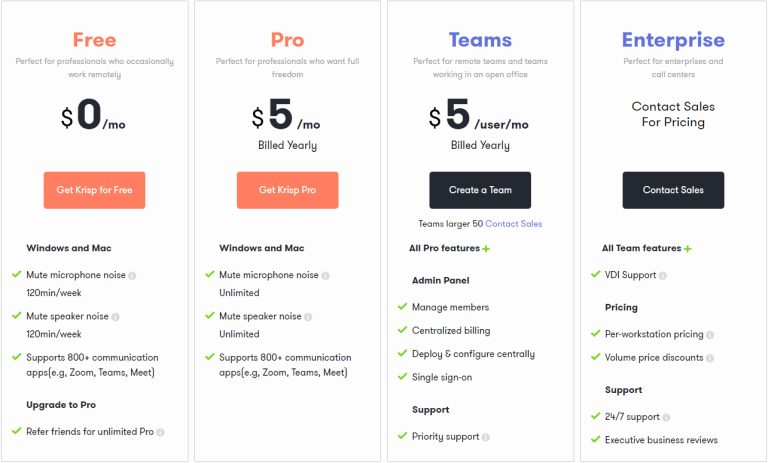
The free tier gives you 120 minutes of filtered calls per week. If you only deal with noisy environments occasionally, like I do, that’s enough. The paid plan is 5 USD a month and removes the time limit:
If you work from home and noise is a problem, give Krisp a try. It does what it promises and the setup takes about two minutes.
It also made TIME’s list of the 100 most innovative apps of 2020, in the AI category. So I’m apparently not the only one who thinks it’s good.
DISCOVER ELEMENT!
Maciej Michalewski
CEO @ Element. Recruitment Automation Software
Recent posts:

Element now has an API: recruitment that plugs into your own systems
Element now has a public API (v1-beta). I explain what integrations give recruitment-system clients, the mistakes I made and what they taught me.

Recruiting from your phone: Element is now mobile, built by AI
Element’s mobile views are in production. Recruiters and hiring managers now run the process from a phone, and AI wrote 15,000 lines of code in five weeks.

You get an email from AI instead of a human, problem?
Getting an email from AI instead of a human is fine, as long as the data stays high quality. Most routine work is algorithmic, and the outcome matters more than the author of the message.

The AI job apocalypse is a fantasy, says a16z. But Poland?
David George of a16z says the AI job apocalypse is a fantasy. I test his thesis against Polish data and a fresh vibe coded experiment of my own.

Vibe Coded Element x LinkedIn integration is live: project recap
LinkedIn approved Element’s public XML feed, fully built in vibe coding mode with Claude Code. What that means for people who don’t write code.

danehr.pl: a new data hub for the Polish labour market
Polskie Forum HR has launched danehr.pl, a portal that gathers employment, wages, unemployment and labour market reports in one place. Element is the technology partner of PFHR and feeds one of the portal’s sections.