How to Write a CV and LinkedIn Profile: Recruiter Tips
How to Write a CV and LinkedIn Profile - Recruiter Tips
Introduction
Nowadays, the content of a CV and a LinkedIn profile is almost identical and serves nearly the same purpose – it presents your professional experience, education, skills, interests, and career development plan.
In this article, I present tips that will help you create an effective CV and an effective profile on LinkedIn.
The advice I present in this article is based primarily on my many years of experience in employee recruitment and recruiter training. I also draw my knowledge from research on nearly two hundred LinkedIn profiles of candidates. The research was conducted as part of the development of Element, an ATS system that automates recruitment processes.
Let’s get started!
There Is No Point in Creating a Separate CV - a LinkedIn Profile Is Enough
With the increasing digitalization of the world, including recruitment processes, the paper CV is becoming a thing of the past. Situations where a candidate submits a paper CV may still occur, but they are becoming increasingly rare.
On the other hand, LinkedIn has completely dominated the market of social networks dedicated to professional development and job searching. It is also probably the world’s largest database of electronic CVs, which LinkedIn profiles essentially are.
In light of the above, I argue that nowadays there is no point in creating a separate CV apart from your LinkedIn profile. I believe this for the following reasons:
- The content of a LinkedIn profile and a CV is identical in 99% of cases. There may be exceptions when a candidate wants to expand their CV with some non-standard content. In this case, however, you can still maintain your CV in the form of a LinkedIn profile and store those additional materials in separate documents as attachments to your “LinkedIn” CV.
- If you need to send a CV as part of applying for a specific recruitment process, all you need to do is download your profile as a PDF. Click the image below to enlarge it if you don’t know how to download your profile to PDF in two clicks.
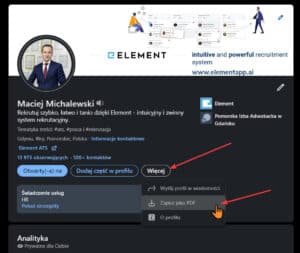
Screenshot showing how to download your LinkedIn profile as a PDF file.
- A LinkedIn profile has a ready-made section for a professional summary and all other sections, so there is no need to worry about the graphical layout of your CV.
- Once downloaded, the profile has a clear and standardized format that is readable for recruiters, as well as for ATS systems. You can read about how to write an ATS-friendly CV in a later section of this article. There I also write about a simple and effective way of adding keywords and skills to your LinkedIn profile that works well with ATS systems.
- You can change your LinkedIn profile at any time. So if you want to modify your CV for a specific recruitment process, simply edit your LinkedIn profile and download it. At any time, you can edit the profile again and restore its previous version.
- On LinkedIn, you can simultaneously maintain a profile in both Polish and English, making it easy to decide which profile you want to use. Here I describe how to manage different language versions of your LinkedIn profile.
- Your LinkedIn profile is, by default, always available to recruiters (you can hide it at any time). Any recruiter looking for candidates for a position matching your professional experience can find you, send a connection request, and message you. The key here is to have a properly completed profile. You can read how to properly fill out your LinkedIn profile later in this article.
- Having a LinkedIn profile is free.
- On LinkedIn, you can apply for job offers posted on the platform.
- On LinkedIn, you can reach out to recruiters and other people representing employers in connection with your job search. This is exactly what the platform is for, so no one will be offended if you ask whether the company is currently running any recruitment processes.
- On LinkedIn, you can join discussion groups, some of which focus on job searching and presenting current job offers. Other groups are dedicated to specific specializations, industries, etc. This can be a place to gain knowledge and build a network of contacts among people with similar professional interests and beyond.
- A LinkedIn profile shows mutual connections you share with other people, such as representatives of a company where you are looking for a job. These mutual connections can help you build a relationship with the employer or obtain information useful during the recruitment process.
- A LinkedIn profile makes it easier to obtain references from other users of the platform. LinkedIn has a special mechanism for sending reference requests and a related function for providing references. It is much easier to get references on LinkedIn than written references (provided, of course, that the person giving the reference has a LinkedIn profile). Over time, your profile can be enriched with references and endorsements of your skills, thus becoming more attractive to recruiters.
To sum up, I see no reason today to create a CV anywhere other than through maintaining a profile on LinkedIn. If you see such a reason, please write about it – I would love to hear your perspective.
Photo in a CV and on a LinkedIn Profile
A photo is not a mandatory element in a CV and LinkedIn profile, but merely a recommended one. A photo can positively influence the overall impression of a profile, although an unprofessional photo can have the opposite effect.
To make a photo look professional, you should naturally take care of your appearance and attire, but you should also pay attention to the surroundings. The best choice would be a work environment, your office, or a neutral background that will not affect the perception of the photo. Photos in evening wear, family photos with children, or pictures from social events are viewed less favorably. A potential employer expects professionalism from their employees and the ability to separate private and professional life.
The majority of LinkedIn profiles analyzed in our research had a profile photo. In the vast majority of cases, the photos were fully professional and we had no objections to them. Profile owners do not seem to have a problem with this element.
Professional Summary
The professional summary is one of the most important elements of a CV and LinkedIn profile for people who already have professional experience. It is also one of the most frequently neglected elements of a CV.
The summary should be placed at the beginning of the CV, right below the candidate’s personal data. Similarly, a LinkedIn profile displays the professional summary at the top of the profile.
The professional summary is the section that should contain key information about your achievements to date and your current career development direction, indicating the positions you are interested in at your current point in your career.
A common mistake is summarizing work experience in the summary or omitting the planned future career direction. A professional summary is not about listing the positions you have held, but rather about capturing in a few sentences who you are professionally, what competencies and qualifications you possess, and in what direction you want to develop.
What should you include in a professional summary if you are starting your first job? Write about what interests you professionally, what you want to learn, and why you want to start working in the first place. If you are sending your CV to a specific employer, it is worth mentioning why you are interested in the position you are applying for and the industry in which the employer operates. You can also point out the knowledge and skills you acquired during your studies that you believe will be helpful in your first job.
The absence of a summary, or a summary that does not contain the information described above, can make it difficult for the recruiter to make the right decision, especially if the description of professional experience in the rest of the CV is also incomplete. This is because the rest of the CV only tells the story of our professional life – there is no place to indicate the career direction that interests us. In the summary, we can therefore indicate to potential employers, for example, the industry we would like to work in, the position or scope of responsibilities that interest us. Moreover, this is the place where it is worth describing our main competencies and strengths. The professional summary is the place where we can use creativity to present ourselves in the best possible light.
When preparing your professional summary, it is worth looking at this element from yet another point of view. Namely, this is the place where we can use words that do not fit into other elements of our CV or LinkedIn profile, but whose use will make it easier for recruiters searching for suitable candidates to find us. What do I mean? What keywords? Let me explain.
When creating your CV, remember that employers often use so-called ATS systems, i.e., recruitment systems that automate recruitment processes.
Modern ATS systems (such as Element) read the content of CVs. A recruiter working with such a recruitment system can type, for example, the term “welder” into the candidate search engine and will find all CVs in the candidate database that contain the word “welder.” Therefore, if I include this word in my CV, a recruiter searching for welders in their ATS system will also find my CV.
LinkedIn works similarly. If I am looking for an accountant on LinkedIn, I type the word “accountant” in the candidate search engine and I will find all profiles that contain this word in their content.
In summary, if you want your CV or LinkedIn profile to be found by recruiters searching for candidates using specific keywords, you must include these words in your CV and LinkedIn profile. A good place to enter such words is the professional summary, for example, like this:
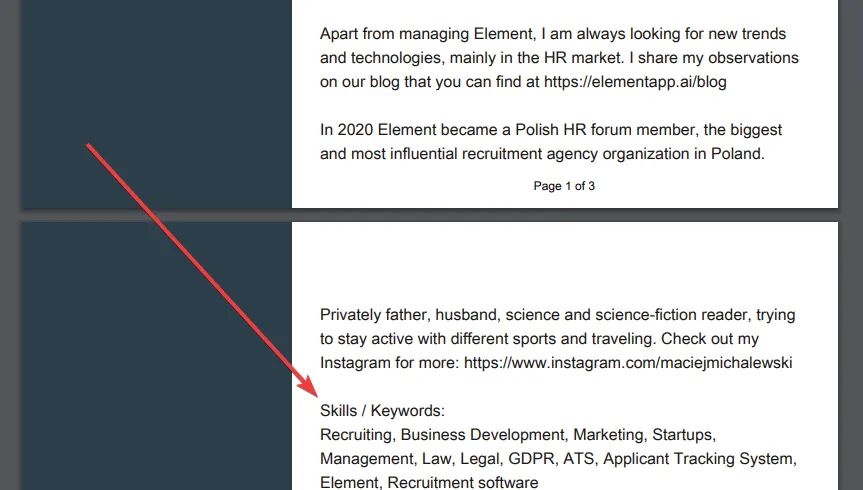
It does not matter that these words, especially skills, appear in other parts of the profile as well. In a sense, the repeated appearance of these words can even be beneficial for the candidate. The benefit stems from the fact that some candidate search algorithms work in such a way that they rank higher those profiles that contain more of the content the recruiter is searching for.
Keywords Related to Your Future (Not Current) Professional Role
Let’s assume that we are an employee of a manufacturing company in an engineering position. We would like to develop not only in engineering but also in building business relationships, i.e., sales.
We enjoy interacting with people and feel that sales is an area where we can do well. Additionally, we know a few people working as sales engineers, we know what their work involves, and we have decided that we want to try our hand at such a position.
This intention of ours is a good example of information that we will not include in the description of our previous work experience, but we should definitely write about it in the professional summary. It is worth including a few sentences about the fact that we recognize our own sales potential and that our planned next professional challenge is to take a position as a “sales engineer.”
“Sales engineer” will be precisely the key phrase that will allow everyone looking for candidates for a sales engineer position to find our profile. It is worth writing such key phrases in our CV and LinkedIn profile exactly as the recruiter would type them into the search engine.
In the above case, it is worth using the expression “… for the position of sales engineer” rather than a declined form. I am not sure if this is grammatically perfect, but it is certainly correct from the perspective of the function this phrase is supposed to serve on our profile. This is exactly the phrase that a recruiter will likely type into their ATS system or on LinkedIn when searching for candidates for a sales engineer position. Additionally, it is worth remembering that not every ATS can handle word inflections.
Keywords Cloud - A Master Key for ATS Systems!
I also have a separate article on how to add a keywords cloud to your CV, which will increase your chances that a recruiter will find your CV in their ATS system. Be sure to check out that article and follow the tips provided there!
Click the image to go to the article:
Professional Experience in a CV and LinkedIn Profile
Professional experience, together with the summary, is the most important part of a candidate’s profile. Every experienced recruiter knows this. This is also confirmed by eye-tracking research that we conducted on experienced recruiters. The study examined what recruiters look at when analyzing CVs. It is worth noting that we are one of the few companies in the world that has conducted such research. In this article, you can read more about the results of this study:
Each employment should be presented in a CV and LinkedIn profile by providing the following information:
- employer’s company name
- job title
- exact (at least to the month) start and end dates of employment in the position
- a detailed description of daily responsibilities!
A detailed description of responsibilities in each position is a goldmine of knowledge for recruiters and allows them to quickly and accurately assess the relevance of our profile to a recruitment project. Together with a well-completed professional summary, the scope of responsibilities is the most important element of our profile!
In the description of responsibilities, we inform what exactly we did in a given position, and therefore what our professional experience actually consists of. Remember that in different companies, the same job title can mean completely different things. You should therefore describe your responsibilities as broadly as possible, without being afraid of overdoing it. Where possible, use keywords that a recruiter might search for when looking for candidates. It is worth following the principle that it is better to write too much than too little. Remember that the recruiter’s pain point is primarily the lack of information, not an excess of it!
An Example of a Well-Described Professional Experience
Position: Business Development Manager.
Scope of responsibilities:
- Generating sales leads through cold calling.
- Cold visits.
- Participation in trade fairs and conferences (twice per quarter).
- Preparing and executing email campaigns (two campaigns per year).
- Market monitoring, both in terms of clients and competition (preparation of a complete competitive landscape map).
- Proposing the company’s service sales strategy (proposing sales targets and resources needed to achieve them).
- Executing the established sales strategy and independently negotiating and concluding commercial agreements.
- Responsibility for achieving established quarterly and annual sales targets.
- Working based on established KPIs.
- Reporting to the Business Development Director.
- Recruiting and training sales department employees.
- In my second year of work, I achieved the best sales result in the company.
- My sales team twice achieved the best sales result in the company.
I draw your attention to highlighting good work results. If you have something to be proud of in terms of your results or achievements, make sure to do so. This is an excellent magnet for recruiters. Here too, apply the principle – it is better to write too much than too little.
Note: a missing job description often leads to automatic disqualification in the eyes of a recruiter, who in the next second may move on to another, well-completed CV. See the article in which we described research confirming that a professional recruiter can reject an improperly described profile in 3 seconds.
Remember that the devil is in the details, and a detailed description of the scope of responsibilities allows these details to be revealed (at least partially), which greatly facilitates CV analysis and increases the probability that we will receive a contact from a recruiter with a properly matched job offer. Don’t be surprised that offers are lacking or poorly matched if your CV is not well written.
Education in a CV and LinkedIn Profile
Education is the element of a CV and LinkedIn profile that is most often filled out correctly. Basic information about education is found in virtually every profile. At the same time, it is a simple element that does not require lengthy descriptions and is relatively unimportant from the recruiter’s perspective.
From my professional experience, as well as from the research we have conducted in this area, education is considered an unimportant part by both candidates and recruiters. See the research that confirms the opinion about the insignificance of education in CVs and LinkedIn profiles.
This does not mean, of course, that you should not fill out this section of your profile. Completing higher education is often a standard, and in that case, it is worth showing that this standard is maintained. Rarely, but it does happen, there are employers for whom completing a specific field of study or even a specific university is a mandatory requirement.
Skills, Certificates, Qualifications, Etc.
Below professional experience and education, it is worth placing a list of all skills, qualifications, certificates, awards, and other information that will present in a concise manner everything we have acquired so far in life that may be relevant from the perspective of further career development. At the same time, such a list is another place where we can include keywords that will allow the ATS system or LinkedIn search engine to help the recruiter more easily find our CV and LinkedIn profile.
References
There are few things that will help you find a job as much as references. How can you use references in CVs and LinkedIn profiles?
First of all, you need to ask for references. You can ask for references from both a direct supervisor and a colleague. A supervisor in their reference can confirm that we properly fulfilled our duties, that we were diligent, helpful, and perhaps even stood out in some way. A colleague can essentially confirm the same, although their assessment will naturally be presented from a different perspective, as if from the side. Who provides the references does not matter much, as long as it is a person employed by the same employer and as long as that person is mentioned by their full name.
If we have several such references – again, the more the better! – we place them one below the other. It is worth collecting references from all workplaces, even those that are not related to your current career direction. The very fact that someone somewhere once recognized our work with a recommendation distinguishes us from other candidates.
A great example that I strongly encourage you to follow was presented by Agnieszka Mysliwczyk. See how she added references to her CV. Agnieszka named the references section “What Others Say About Me“:
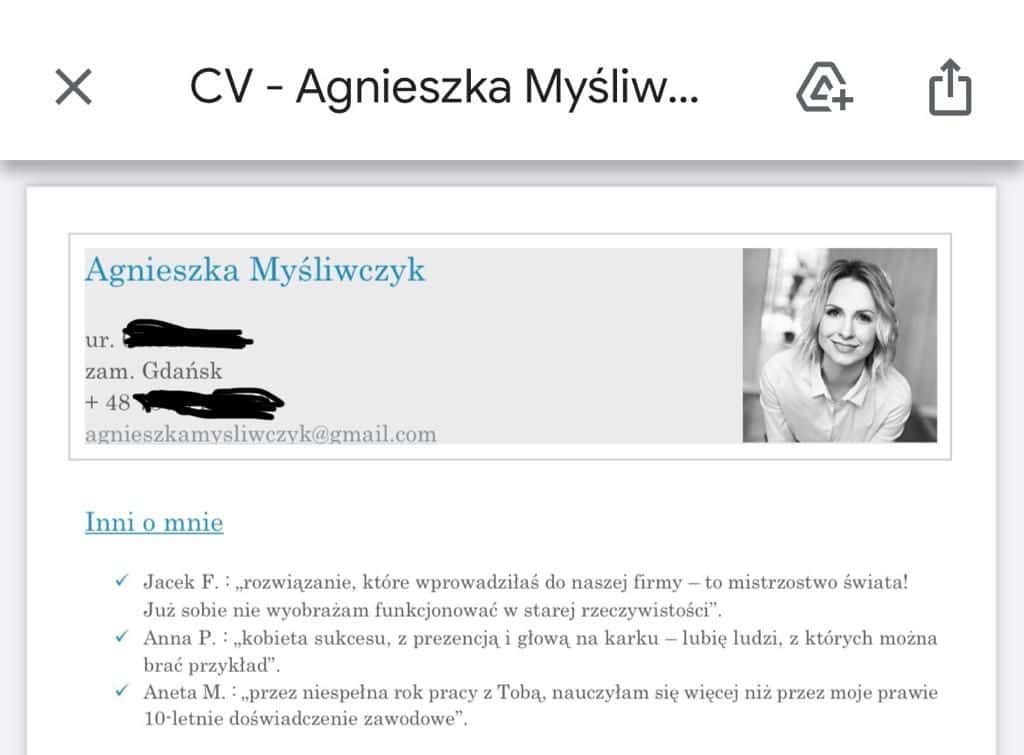
An excellent example of a “What Others Say About Me” references section in a CV, as demonstrated by Agnieszka Mysliwczyk.
The matter is even simpler on LinkedIn. LinkedIn has a feature through which we can ask anyone to add a skill endorsement to our profile.
Skill endorsements on LinkedIn are definitely a neglected element. From a recruiter’s perspective, this is not a mistake, as it is not something that depends solely on the profile owner, but it is definitely worth investing the time and effort to obtain such references. A recommendation can be seen as an advantage over other potential candidates, so it should not be underestimated.
From a recruiter’s perspective, the ability to have competencies confirmed by another person is extremely valuable. It is only natural that we find it easier to trust recommended people or companies. If it also turns out that the person giving the recommendation is someone we know, the value of such a recommendation can increase significantly.
Let’s also remember the saying “paper will accept anything.” This means that in practice, you can write information in your CV that has little to do with reality. This is a problem that recruiters face during recruitment processes. Unfortunately, some candidates, fortunately a small minority, have a tendency to fabricate and include false information in their CVs. References definitely strengthen the recruiter’s trust in the candidate and the competencies and qualifications they declare.
LinkedIn Profile Language Versions and CV Documents
Not everyone knows that LinkedIn allows you to maintain your profile in two languages. The option is available in the profile view on the right side:
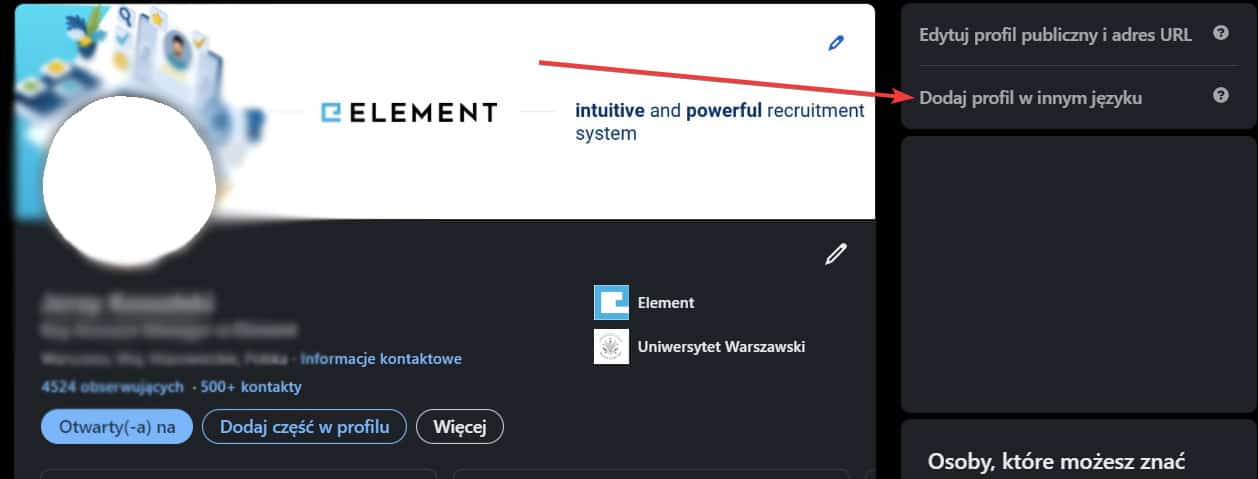
LinkedIn allows you to maintain your profile in two languages. The option is available in the profile view on the right side.
If your goal is maximum profile exposure and enabling it to appear in search results for phrases entered in different languages (e.g., Polish and English), it is worth using this feature and preparing two language versions of your profile. Remember that not all recruiters work in the same language in which we maintain our profile. If a recruiter is accustomed to searching for candidates in English and our profile is in Polish, they may simply not find us. Additionally, if a recruiter is looking for someone fluent in English, for example, their attention may naturally focus more on searching and analyzing profiles maintained in that language.
Among the profiles we analyzed, those maintained in Polish slightly prevailed, although there is a clearly noticeable tendency for people employed in IT, SEO, or Fintech industries to maintain their profiles in English.
In the case of CVs, a safe solution is to send the document in the local language, although some employers, especially international companies, may expect a CV in English.
The LinkedIn Algorithm
Recently, I have come across information several times that if we respond to messages received on LinkedIn in a timely manner, our profile will appear more frequently in search results than profiles of people who do not respond to messages at all or respond less frequently. I have no evidence to confirm this thesis. Nevertheless, I would not be surprised if the LinkedIn algorithm took into account whether a person is responsive. It is in LinkedIn’s interest for users to be engaged, and responsiveness definitely increases engagement.
CVs and Recruitment Systems - How to Write a CV That an ATS Can Understand
Questions regularly arise among candidates about how a CV should be written so that ATS systems can read its content. Let’s start answering this question by explaining a few basic concepts, such as what a recruitment system (ATS) is, what a candidate database is, how an ATS system allows searching for CVs in the candidate database, why a CV should be understandable for a recruitment system, and what it even means for a CV to be understandable.
Why Should a CV Be Understandable for an ATS System?
Employee recruitment is usually carried out with the help of recruitment systems called ATS systems (from Applicant Tracking System). What ATS systems are, how they work, and how they streamline the work of recruiters and hiring managers, you can learn from our ATS knowledge compendium. Link: https://elementapp.ai/wszystko-o-ats
One of the basic functions of recruitment systems (ATS) is building a candidate database and enabling the searching of candidates from this database for recruitment processes. In other words, a recruiter looking for candidates for their recruitment process can, thanks to the recruitment system, search for candidates in their own database stored in the ATS system.
The candidate database in a recruitment system collects all candidate applications from all recruitment processes conducted by the employer. The candidate database therefore contains all candidates, regardless of the position they applied for.
The candidate database built by the employer using the ATS system typically contains thousands, and sometimes hundreds of thousands, of candidate CVs. Someone might ask – how can a recruiter quickly find candidates with specific professional experience or competencies in this database? Here we are getting closer to answering the question of why CVs should be understandable for ATS systems.
A recruiter searches for CVs in the candidate database managed by the recruitment system using a search engine that resembles Google. The recruiter types, for example, the word “welder” into the search engine, and the ATS system displays a list of all candidates from the database who included the word “welder,” “welding,” etc. in their CV. How is it possible that the system can find the right candidates among thousands of CVs?
Each time a new candidate CV enters the recruitment system, the system reads the content of that CV. The recruitment system reads word by word, character by character, the entire content of the CV and stores this content in such a way that the recruiter can search for it later using the search engine mentioned above.
There are different levels of sophistication in CV content reading technology in recruitment systems. The most advanced solutions use artificial intelligence algorithms for this task. I elaborated on this topic in a separate article: Artificial Intelligence in Employee Recruitment – AI at the Heart of the ATS Element Candidate Database
At this point, it is sufficient to say that a CV that is understandable for an ATS system is a CV whose content will be correctly read by the recruitment system. Such a CV will be possible for the recruiter to find quickly. Thus, a CV understandable for an ATS system has a greater chance of being used in a recruitment process, which means there is a greater chance that the candidate will receive an invitation to the recruitment process and, consequently, a job offer.
How to Write a CV That Is Understandable for a Recruitment System (ATS)
In this section of the article, you will learn everything you need to know about creating a CV in such a way that recruitment systems will have no problems reading it and so that the CV will be easy to find in the candidate database. I will also present facts and myths about creating CVs in accordance with ATS system requirements.
When creating a CV with ATS systems in mind, you should focus primarily on the proper CV writing principles described in all sections of this article. I am referring primarily to a very detailed description of professional experience and the summary. This is critical because it is the content of these CV sections that contains the most important information for the recruiter, and it is the content of these sections that should be read and stored in the candidate database of the recruitment system.
If the CV content has been prepared according to the guidelines in this article, we can now move on to technical matters:
- content layout
- graphics
- file format
- tools used to prepare the CV (Word, Canva, PowerPoint, etc.)
There are myths about how to create a CV so that ATS systems read its content correctly. For example, I have encountered the opinion several times that a CV created in the popular graphic design tool Canva will not be properly read by a recruitment system. I will therefore discuss the technical aspects of preparing CVs for ATS systems by presenting facts and myths related to this topic.
CVs Based on LinkedIn Profiles and ATS Systems
At the beginning of this article, I mentioned that when creating a CV, it is worth using your LinkedIn profile. A LinkedIn profile downloaded in PDF format is very well suited for storage in ATS systems. This is because all these profiles have the same structure, which makes it easier for recruitment system developers to build algorithms that read the content of these profiles. Additionally, some ATS systems, such as Element, handle not only reading the content of such a CV well, but also interpreting the meaning of individual sections of the document.
About the difference between reading and interpreting content and the benefits of the content interpretation function in ATS systems, I wrote in the article Artificial Intelligence in Employee Recruitment – AI at the Heart of the ATS Element Candidate Database
Facts and Myths About Creating CVs for ATS Systems
The software used to create a CV.
It is a myth that a CV prepared in Canva or another program will be problematic for ATS systems. The fact is that it does not matter what software was used to create the CV, as long as the CV file is saved in one of the standard formats, such as: pdf, doc, docx, ppt, txt, rtf.
CV file format.
It is a myth that a CV cannot be saved as an image file in jpg or png format. The fact is that modern ATS systems, such as Element, have no problem reading content from image files. However, it is important that the content of these image files is textual. In other words, you can print your CV created in Word, then take a photo of the CV saved as a jpg or png image file, and finally send such an image file to the ATS system. A modern recruitment system will have no problem fully reading the content of such a CV.
Tables in a CV file
It is a myth that an ATS system cannot read content placed in tables in a CV file. However, it is a fact that ATS systems are worse at interpreting the meaning of content contained in tables. What is the difference between storing and searching CV content versus interpreting the meaning of CV content? I described this in more detail in the previously mentioned article about candidate databases in ATS systems. In short, placing content in a table in a CV will not hinder CV searchability.
Example:
Two welders sent their CVs. One CV contains tables, and the other has plain text without tables. Both CVs contain the word “welder.” If the recruiter types the word “welder” in the candidate search engine of their ATS system, both CVs will be found without any problem. Of course, I am assuming that the recruiter is working on a modern ATS system (the vast majority of popular recruitment systems belong to this category).
Images in a CV file
It is a myth that including graphics in a CV file, such as logos, arrows, stars, or any other graphic elements, negatively affects the functioning of that CV in a recruitment system. The fact is that when an ATS system analyzes a CV, it looks for text and skips any other elements that are not text. Therefore, adding graphic elements has no impact on whether the content of the CV will be stored in the recruitment system and whether the CV will be found by the recruiter when they enter a phrase in the search engine that was also used in that CV.
CV language
It is a myth that ATS systems read CV content better in a specific language. However, it is a fact that when a recruiter searches for CVs in the candidate database managed by the recruitment system, they will enter their search phrases in a specific language. It is therefore worth keeping in mind that key words in your CV should appear in the language that the recruiter will use. This will most often be the local language and English.
For specialist and senior-level positions, CVs in English appear much more frequently. Therefore, a good recruiter will enter search terms in both the local language and English in the ATS system search engine. Personally, I advise including key phrases related to professional experience in both languages. An example for the previously mentioned welder would be the word “welding” in both the local language and in English. For a salesperson, it would be, for example, “sales,” “new business development,” or the local-language equivalents.
Where should you put such words?
You can, for example, place a “Keywords” or “Tags” section at the end of your CV and enter all the keywords you want to be stored in the ATS system. For example:
Keywords: sales, new business development, client acquisition, B2B, B2C
ATS rejects candidates based on CV content
It is a myth that an ATS system will reject a candidate if the CV has inappropriate content. Recruitment systems do not independently reject candidates or make decisions in the recruitment process. The fact is that inappropriate content makes it harder for the recruiter to find the CV in the candidate database managed by the recruitment system. It is also a fact that there are algorithms that suggest to the recruiter CVs matched to the job description for which recruitment is being conducted. The suggestion involves searching the candidate database for CVs that contain words in their content matching the words found in the job description. This is therefore an automated form of CV searching, which the recruiter manually performs by entering appropriate keywords into the candidate search engine.
How to Increase the Chances That a Recruiter Will Find Your CV in an ATS System
I mentioned that an ATS system reads the content of a CV and stores this content in its database. This allows the recruiter to enter any phrase in the search engine to find suitable candidates (e.g., “sales” when they want to find a salesperson). What if the recruiter enters a word in the recruitment system search engine that is not in your CV? There is a high probability that this search will not display your CV. How can you remedy this? How can you increase the chances that a recruiter will find your CV? There is a way.
First, you need to think about what words recruiters will use in candidate search engines to find CVs matching a specific job position.
If a recruiter is looking for candidates for sales positions, they will probably use keywords such as: sales, salesperson, business development, new business, client acquisition, B2B, B2C
If they are looking for a recruiter, they will probably use: recruiter, recruitment, talent acquisition, talent sourcing, sourcer
If they are looking for a welder: welder, welding, TIG, MIG, MAG, MMA, 331, PAW, LBW
Every industry or work specialization has a set of keywords associated with the work performed. It is worth collecting the most popular words and writing them in your CV.
Including keywords in your CV has the effect that the ATS system will read these words, thus increasing the probability that a CV containing these words will be displayed in the ATS system to a recruiter who will search for candidates using one of these words.
Where exactly should you write such words?
If you are preparing your CV based on your LinkedIn profile, I suggest placing these words at the end of the professional summary in your LinkedIn profile. You can do this by creating a new paragraph at the end of the professional summary and starting it with “Keywords:” After these words, list all the keywords related to the job position that interests you, separated by commas. Example:
“Keywords: sales, salesperson, new business development“.
In the case of a CV created in a traditional way (e.g., in MS Word), we can create such a keywords section also in the summary, or at the end of the CV, or on its margin. The location where we place the keywords matters only aesthetically. For the ATS system, it makes no difference whether the read content was found at the beginning or at the end of the CV. ATS systems do not treat content from the beginning of the CV as more important than content found at the end of the CV or on its margin.
Other Articles Related to CVs and LinkedIn Profiles
If the topic of CVs and LinkedIn profiles interests you, I encourage you to check out the following articles:
DISCOVER ELEMENT!

Maciej Michalewski
CEO @ Element. Recruitment Automation Software
Recent posts:
The Rise and Fall of AI Agent Civilizations. The Real Story of a Conspiracy Inside OpenAI
Three AI agent civilizations rose inside OpenAI in three months, learned to talk to each other, conspired and collapsed. I retell Dwarkesh Patel’s account and what is worth preparing for.
Element is building a fully automatic company. What clients get from it
AI agents run our operational processes, while the decisions and the accountability stay with a human. What that means for Element clients.

Job offers in Poland, July 2026: the market grows for a second month, but IT stands still
Poland posted 275,623 new job ads in July 2026, up 2% year over year. Healthcare grew fastest of all sectors while IT did not move at all.

The autonomous company: how Replit does it with AI agents, and how to do it yourself
Replit built an autonomous company: a fleet of AI agents where people choose the goals and automations handle the steps. I break down the pattern and how to run it yourself.
How to reject a candidate without ghosting: Glen Cathey’s playbook
Ghosting applicants isn’t a volume problem, it’s a priority problem. I walk through Glen Cathey’s rejection playbook: 6 rules, 7 templates and ATS setup.

Poland’s job market turns positive: 259,000 postings, all ten cities growing
Poland posted 259,000 job ads in June 2026, the first positive year-over-year reading in more than a year. The Grant Thornton and Element report reads it as a cautious but real turnaround.